Do you need a logo for your new creative project or website? You can use free logo makers to create your own logo. The logo is an important business brand. This is the first time before starting your business. A logo is a face as well as a reflection of the values of a business. That’s why a logo is the first thing you have to think about.
Although, many startup business people care less about how important a logo is when starting a business. Is it because the cost of creating a logo is quite expensive or they don’t have the idea to create their logo or brand?
Whatever it was, the logo is an important thing you should consider before launching a new business. If you do not have enough budget to pay the designer, I guess you do not need to waste time. Because you can make it super easy logo without needing graphic design expertise. One way is to use logo makers or logo generators.
Why Logos Are So Important for Your Business
The logo is the visual elements of a business that is a reflection of her personality, a representation of the values and principles of your business identity. That’s why you need a logo that is well designed, serves to communicate these values in a visual form that can represent the personality of the business you are in.
The reason why logos are so important for your business
- Become a distinctive identification mark of a company or brand
- Your company looks more professional
- People easily remember your business
- Become an attribute that conveys the personality, character, or attitude of the company
- Provide a good image for the company
- Invite new customers interested
If the logo on your business looks professional and easy to remember, so your customers can be inspired by your business. Apart from that, another important thing is that you have to provide good products and services. A logo that looks professional can generate trust in new customers.
How to Create Your Own Logo?
There are some tips that you must know before making a logo online. For that, there are some knowledge tips that you should know before creating a logo for your new business.
Simple and Easy to remember
simple is an important keyword for a logo. The simpler a logo looks, the easier it will be to recognize and remember. When you can create a simple logo, it means that you can convey your brand image effectively and efficiently. So, what is the simple logo shape? A simple logo consists of shape, number of elements, and color. That’s why you must use more than three color combinations in the logo.
Unique
The logo must be unique! Logos help you differentiate yourself from competitors’ businesses. For that, think about an out-of-the-box logo concept. The trick is to fight the trend of logos in the business you are in. For example, if you want to start a coffee cafe, you can use a different design from the initial concept, which is what people commonly use, such as cups and coffee beans.
10 Best Free Logo Makers To Create Your Own Logo
Looking for the best free logo maker? Want to create an easy logo without graphic design knowledge? Here are the best free logo makers.
1. Canva
Canva best free logo maker
Canva is a design platform created to help non-designers meet their visual content needs. With Canva, you can design a variety of materials to support your business brand awareness and personal branding. Such as presentations, posters, to Instagram stories. Of course, logo design is one of them
Designing a logo on Canva is quite easy, even for a beginner level. If you don’t have any ideas yet, just use the logo templates provided by Canva. Just type in keywords related to your business in the top left corner. Then, Canva will provide you with a myriad of attractive template choices. To make it more unique, you can change this logo template by changing the color, brand name, tagline, fonts, and adding or removing other elements by simply dragging and dropping.
2. Tailor Brands

tailor brands
Tailor Brands is an effective all-in-one graphic design tool that will allow you to design a custom and one of a kind logo for your business. The logo creation process is based on a quiz where you need to answer questions regarding your brand, business, and preferences. When you complete the quiz, you are going to receive your logo done in no time.
You do not need any design experience or a big budget to use Tailor Brands, only enter some keyword information about your business, personalize it to your own liking, and start using your logo anywhere!
Tailor Brands will provide you with a few alternative options so that you can choose what you like the most or customize your logo until you’re delighted with it.
3. Oberlo Logo Maker

Oberlo Logo Maker
Oberlo is a dropshipping add-on made exclusively for Shopify. In addition, Oberlo also provides features for free online shop logo designs.
The Oberlo Logo Maker UI interface provides an experience for beginners or professionals who need a free logo design without having to pay. Once you’re logged in, you’ll immediately see a large white canvas and menu options on the left. There are three submenus in the menu, namely the name of the online shop, the choice of icon, and the choice of text position and the main icon
Oberlo is perfect for those of you who want to create a generic logo design. In other words, logos are created without time-consuming or complicated stylistic customization. Just design for a moment and enter your email to get the logo
4. Hatchful

Hatchful
Hatchful is the best online tool for creating logos online. It makes designing a logo easy and fun. Whether you’re new to design or have some experience, Hatchful helps you create a professional logo. The interface is simple, guiding you through each step.
Customizing your logo is easy with Hatchful. You can add your text, choose fonts, and pick colors. You can also select icons and adjust the layout. This lets your logo show off your unique style and stand out.
5. Turbologo
Turbologo
Turbologo is a multifunctional logo maker that helps you to create the best brand for your company or business. Thanks to the advanced AI it allows you to get a better experience for designing logos.
Besides that, the template editor from Turbologo is super simple and responsive for users. This is one or the excess that we like from this logo maker.
How do I create a logo online using the logo maker? First, please visit Turbologo and then enter information about your business such as company name, slogan, enter company industry. Next, select the color you like, select the icon and the logo is ready. Super easy right? Only a few minutes you can create your own logo.
6. Supalogo
Supa Logo best free logo maker for website
Supalogo is the best free logo maker that helps you to create a logo or slogan. Personally, this is a super easy online logo maker that I’ve come across on the internet. You don’t need registration and experience in graphic design. In just a couple of minutes, you can create a logo or slogan for your website.
Interestingly, Supalogo is always updated with the latest fonts, maybe every week. Beautiful fonts help you to make your website slogan better. You can also filter colors and sizes according to what you need.
7. GraphicSprings

GraphicSprings best logo maker tool
GraphicSprings is an online logo maker to help you design various kinds of branding. Some of the projects you can create are business cards, brochures, posters, letterheads, etc. Not only that, GraphicSprings is the right choice for designing logos that are versatile and can be used in various branding media.
With GraphicSprings, you can create logo designs in a couple of minutes. Although the online logo design super fast and easy, you can still experiment and have fun to develop your creativity.
This platform has many varied icons compared to other logo makers. This is of course a plus point for various design needs.
8. Sologo.ai
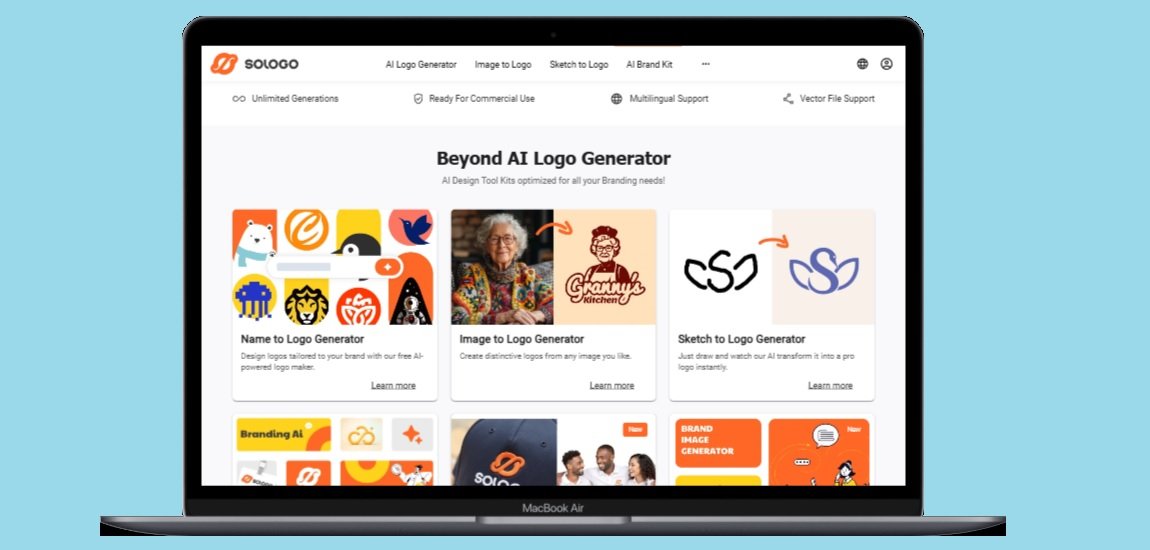
Sologo.ai helps you create logos for your business or project using AI. Just type in your brand name or upload an image, and it generates logo ideas. You don’t need design skills to get a professional logo, and it’s free. The logos are ready for commercial use, so you can use them on anything you sell or share.
In addition to logos, Sologo.ai offers a complete brand kit. You can see your logo on items like business cards, T-shirts, and social media posts. The site lets you easily change colors, text, and other design elements until it’s perfect. You can also download your logo in various file types for online or print use.
Many users worldwide create their brands with Sologo.ai, from small business owners to freelancers. The tool is user-friendly and supports many languages, so nearly anyone can use it. Whether you’re opening a shop, running a restaurant, or working on a side project, Sologo.ai has everything you need to make your brand shine.
9. Logopony
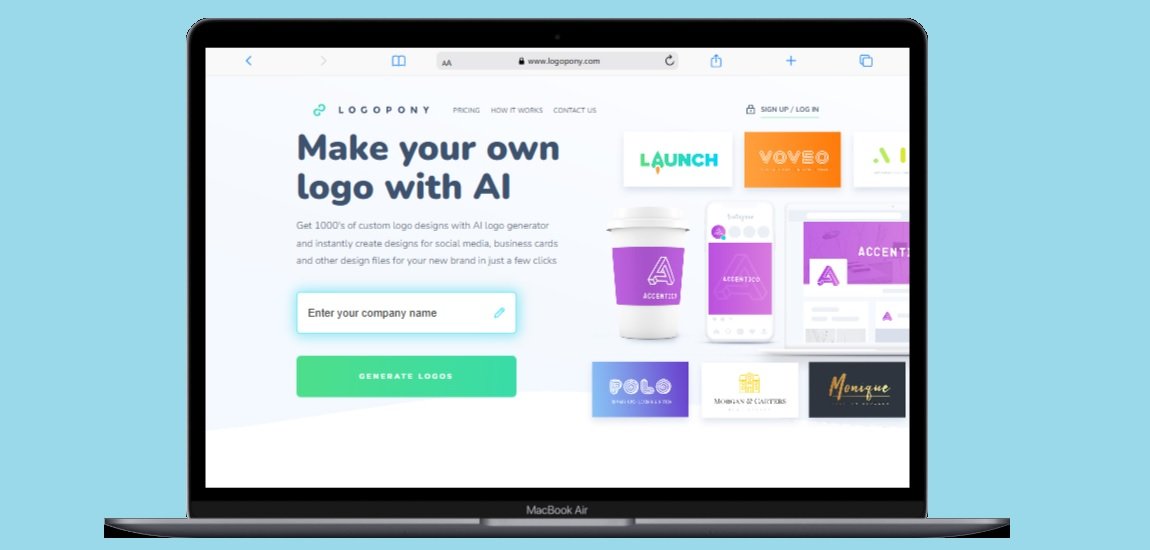
Logopony.com helps you create a logo for your business or project without design skills. Just enter your company name and answer a few questions. The site uses AI to generate thousands of logo ideas in seconds. You can pick your favorite and adjust it using their simple editor. It’s fast, fun, and perfect for anyone wanting a professional logo without hiring a designer.
When you finish your logo, Logopony provides everything needed to brand your business. You’ll receive over 30 different files, including versions for social media, business cards, websites, T-shirts, and packaging. All logos are ready to use, and you can download them anytime. The best part? You only pay once—no monthly fees or hidden costs—and you get lifetime access to edit and download your logo whenever you need.
Logopony is trusted by many, from startup founders to small business owners, because it makes branding simple and affordable. The logos are designed to be timeless, ensuring they won’t go out of style. You can use them for anything, even selling products with your logo. Whether you’re opening a coffee shop, starting a craft business, or need a logo for a school project, Logopony has you covered.
10. Fotor Logo Creator

fotor logo creator
Fotor is one of the best and professional logo makers. It provides so many logo templates, allows you to create a logo with a couple of minutes and simple steps, without any graphic design skills required.
This website is popular for so many different purposes such as webmasters, students, teachers, graphic designers, and more. To create a logo you just need to drag and drop the design template, change the text, background, and add the stickers as you like.
That was a list of the best free logo makers you can use and design by yourself. If you are beginners, some of the tools above are reliable and you don’t have to pay designers and spend your budget. But in the futur,e your logo has to look professional, you may have to redesign i,t and that’s even better. Thanks for visiting. Have a nice day.
Frequently Asked Questions (FAQ)
Why do I need a logo for my business?
A logo is the face of your business. It helps people recognize your brand and shows what you stand for. A good logo makes your business look professional and helps customers remember you. It can attract new customers and build trust in your products or services.
Can I create a logo without any design experience?
Yes! The free logo makers in this article are made for those without design skills. They offer templates and easy tools, letting you create a logo by answering questions, dragging elements, or making simple changes.
Are these logo makers really free?
Most logo makers listed have free versions. You can create and download a basic logo without paying. Some may offer premium features or high-resolution downloads for a fee, but you can still make a usable logo for free.
What makes a good logo design?
A good logo is simple and memorable. It should be unique to stand out from competitors. Use no more than three colors to keep it clean. Think about what makes your business special and reflect that in your design.
How long does it take to create a logo using these tools?
You can create a logo in just a few minutes with these tools. Some, like Turbologo and Supalogo, can generate a logo in under 5 minutes. Others may take 10-15 minutes for more customization.
Can I use the logos I create for my business?
Yes, you can use the logos you create for your business. Most tools provide logos that are ready for commercial use, allowing you to feature them on products, websites, social media, and other materials.
Do I need to pay for the logo files after creating them?
It depends on the tool. Some, like Logopony, require a one-time payment for all files. Others offer basic files for free. With Logopony, you pay once and get lifetime access to edit and download your logo.
What file formats will I get from these logo makers?
Most logo makers provide various file formats for different uses. You’ll typically get files for web (like PNG or JPG) and print (like PDF or SVG). Some also provide files for social media and business cards.
Will my logo look professional if I use a free logo maker?
Yes! These tools are designed to create professional-looking logos, even for non-designers. They use templates and design principles to ensure your logo looks polished and suitable for business.
Can I edit my logo after creating it?
Most logo makers let you edit your logo after creation. Tools like Canva allow you to save and change your designs later. Some platforms require an account to save your work for future editing.
Conclusion
Creating a logo is a key first step for any business. Your logo represents your values and helps customers remember you. If you’re starting out with a limited budget, you don’t need to hire a designer or have special skills to create a professional logo.
The free logo makers in this article allow anyone to make a great-looking logo quickly. Tools like Canva, Tailor Brands, Hatchful, Sologo.ai, and Logopony have user-friendly interfaces that guide you through each step. You can customize colors, fonts, and icons to fit your brand’s personality.
Remember, a good logo should be simple, unique, and reflect what makes your business special. With these free tools, you can try different designs until you find the perfect one. After creating, you can download your logo in various formats and use it on your website, social media, business cards, and products.
Don’t let a limited budget hold you back from creating a strong brand identity. Try one of these free logo makers today and give your business the visual identity it deserves to stand out.
You May Also Like
 Online Services
22 Best Free Sites to Receive SMS Online for Verification Without a Phone
 Cyber Security
Is Temu Legit or a Scam? The Complete Truth You Need to Know
 Online Services
15 Free Movie Apps for Android: Your Complete Guide to Legal Streaming in 2026
 Cyber Security
Is OffGamers Legit? Complete Review and Analysis of the Digital Game Store
 Online Services
9 Best Free PDF Editor Tools Online And Offline For Windows 10/11
 Online Services
10 Best Tumblr Alternatives For Free To Use
 Online Services
10 Best Websites To Download Free Fonts: A Designer’s Ultimate Resource
 Online Services
20 Best Sites To Download Free Stock Photos For Personal and Commercial Use
 Online Services