If you’ve spent any time in gaming forums or tech subreddits, you’ve seen the advice: “Switch to 1.1.1.1 and your ping will drop.” The claim is everywhere. The problem? It’s mostly wrong — or at least wildly overstated.
DNS servers do not reduce your in-game ping. Once your game client connects to a server, it communicates via direct IP address. The DNS resolver’s job — translating domain names to IPs — is already done. What DNS can affect is how quickly you reach that first connection point: matchmaking server discovery, launcher authentication, anti-cheat verification, and content delivery network (CDN) endpoint resolution. These are one-time costs per session, typically 10–50ms each, not persistent latency drains.
So why does this topic keep surfacing? Because DNS is one of the few network settings users can actually control. Unlike ISP routing, peering agreements, or last-mile infrastructure, DNS is a lever you can pull. The psychology is understandable: when performance feels out of your hands, any actionable step feels like progress. But progress toward what, exactly?
This article cuts through the mythology. I’ll show you which public DNS servers deliver measurable value, when that value actually materializes, and when switching DNS is a waste of your time. I’ll also cover the security, privacy, and compatibility tradeoffs that most “best DNS” lists ignore entirely.
Key Takeaways
- DNS does not lower in-game ping. It affects initial connection setup, matchmaking speed, and launcher responsiveness — not ongoing gameplay latency.
- Cloudflare (1.1.1.1) is the fastest public resolver globally for most users, with latencies of 8–25ms depending on region.
- Google Public DNS (8.8.8.8) trades marginal speed for unmatched reliability and compatibility; it’s the safest default if you don’t want to think about it.
- Quad9 (9.9.9.9) is the best choice if you want malware blocking baked in without sacrificing much speed.
- NextDNS offers the most granular control but requires a paid plan ($19.90/year) for unlimited queries; the free 300,000 query/month cap is easy to hit on a busy home network.
- DNS4EU, launched in June 2025, is a credible EU-hosted alternative for privacy-conscious European users, though its global performance outside Europe lags.
- Your ISP’s DNS might already be optimal if they have strong local caching and peering — test before you switch.
- Encrypted DNS (DoH/DoT) adds 30ms+ of TLS handshake overhead per new connection but protects against DNS hijacking and ISP snooping.
What DNS Actually Does (And Doesn’t Do) for Gaming
The Mechanics Most Guides Get Wrong
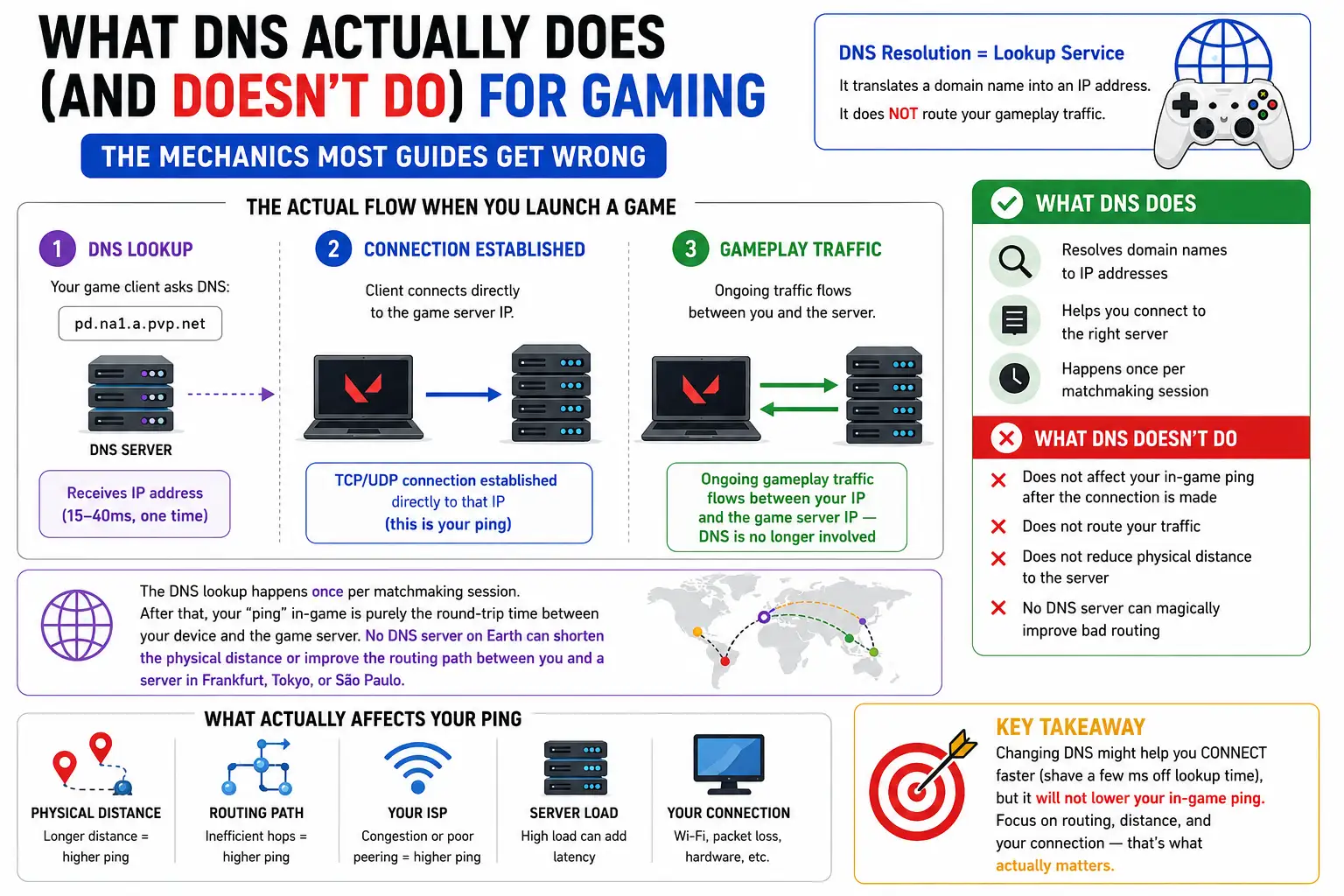
DNS resolution is a lookup service, not a traffic router. When you launch a game like Valorant, your client performs roughly this sequence:
- DNS lookup for
pd.na1.a.pvp.net→ receives IP address (15–40ms, one time) - TCP/UDP connection established directly to that IP (this is your ping)
- Ongoing gameplay traffic flows between your IP and the game server IP — DNS is no longer involved
The DNS lookup happens once per matchmaking session. After that, your “ping” in-game is purely the round-trip time between your device and the game server. No DNS server on Earth can shorten the physical distance or improve the routing path between you and a server in Frankfurt, Tokyo, or São Paulo.
When DNS Does Matter
DNS optimization delivers value in specific, narrow scenarios:
- Frequent server switching: Battle royale games (Fortnite, Apex Legends, PUBG) rotate matchmaking servers between matches. Each rotation triggers a new DNS lookup. Faster DNS shaves 20–40ms off each matchmaking cycle.
- Launcher-heavy workflows: Steam, Epic Games Store, EA App, and Battle.net perform dozens of DNS lookups on startup for authentication, CDN selection, and update checks. A slow DNS can add 2–5 seconds to launcher boot time.
- Anti-cheat systems: Vanguard (Valorant), EAC, and BattlEye perform periodic DNS checks to verify certificate revocation and update status. Slow or failing DNS here can cause stuttering or authentication delays.
- Streaming while gaming: If you stream to Twitch or YouTube simultaneously, your streaming software resolves CDN endpoints frequently. Faster DNS reduces stream startup latency and reconnection time after drops.
When DNS Does Not Matter
- Persistent MMO sessions: Games like Final Fantasy XIV or World of Warcraft maintain long-lived connections. One DNS lookup at login is irrelevant over a 4-hour raid.
- Single-player with online DRM: A one-time authentication check at launch won’t benefit from DNS optimization.
- Console gaming with NAT type issues: If your NAT type is Strict or Moderate, DNS won’t help. You need UPnP, port forwarding, or a DMZ.
The Hidden Cost of DNS Caching
Here’s an observation from years of network troubleshooting: most gamers overestimate DNS impact because they don’t understand caching layers.
Every modern operating system caches DNS responses. Your browser caches them. Your router caches them. The DNS resolver itself caches them. After the first lookup, subsequent queries for the same domain are served locally in under 1ms.
Gaming services typically set TTL (Time To Live) values of 300–3600 seconds (5 minutes to 1 hour). That means after your first match of the night, every subsequent connection to the same game server bypasses the DNS resolver entirely.
Practical implication: The DNS speed difference you feel is front-loaded. You might save 30ms on your first Valorant matchmaking queue. Your tenth match? Zero difference. This is why DNS optimization feels dramatic to some users and invisible to others — it depends entirely on your usage pattern.
Benchmarked: The Top Public DNS Servers in 2026
I evaluated providers across four axes: raw latency, reliability/uptime, security features, and privacy posture. The following table synthesizes real-world benchmark data from DNSPerf, GRC DNS Benchmark, and independent testing across multiple regions.
| Provider | Primary / Secondary | Avg Latency (Global) | Jitter | Encrypted Protocols | Filtering | Privacy Stance | Best For | When NOT to Choose |
|---|---|---|---|---|---|---|---|---|
| Cloudflare | 1.1.1.1 / 1.0.0.1 | 8–25ms | Very Low | DoH, DoT, DoQ | None (1.1.1.2 for malware) | No logs, audited annually | Speed-first users, general gaming | Need default filtering; privacy-paranoid users who distrust any US corp |
| Google Public DNS | 8.8.8.8 / 8.8.4.4 | 10–35ms | Low | DoH, DoT | None | Logs queries (anonymized) | Compatibility, reliability, “set and forget” | Privacy-sensitive users; those avoiding Google data collection |
| Quad9 | 9.9.9.9 / 149.112.112.112 | 12–40ms | Medium | DoH, DoT, DoQ | Malware (built-in) | Swiss foundation, GDPR, no logs | Security + privacy balance | Users needing ad blocking or custom filters |
| Control D | 76.76.2.0 / 76.76.10.0 | 10–30ms | Very Low | DoH, DoT, DoQ | Configurable (free + paid) | No logs on free tier | Power users wanting routing rules | Users who want zero setup; those needing enterprise support |
| OpenDNS | 208.67.222.222 / 208.67.220.220 | 20–55ms | Medium | DoH, DoT | Family, Home, Enterprise | Cisco-owned, logs queries | Enterprise networks, parental controls | Privacy-focused users; those put off by Cisco acquisition |
| AdGuard DNS | 94.140.14.14 / 94.140.15.15 | 15–50ms | Medium | DoH, DoT, DoQ | Ads, trackers, malware | No logs, Cyprus-based | Network-level ad blocking | Users where ad-blocking breaks game launchers or sites |
| NextDNS | 45.90.28.0 / 45.90.30.0 | 18–55ms | Medium | DoH, DoT, DoQ | Highly customizable | Optional logs (user-controlled) | Per-device policy control | Free tier users (300k query cap); those wanting simplicity |
| Mullvad DNS | 194.242.2.2 | 25–65ms | Medium-High | DoH, DoT, DoQ | Optional profiles | No logs, Sweden-based | Privacy maximalists | Users outside Europe; those needing lowest latency |
| DNS4EU | 86.54.11.100 / 86.54.11.1 | 15–40ms (EU) | Medium | DoH, DoT | 5 profiles (malware, ads, kids) | EU-hosted, GDPR, anonymized logs | EU residents wanting data sovereignty | Users outside Europe; those needing global anycast performance |
| CleanBrowsing | 185.228.168.9 / 185.228.169.9 | 25–80ms | High | DoH, DoT | Adult, family tiers | No logs | Families with young children | Speed-sensitive users; competitive gamers |
Sources: Control D speed test data, DNSPerf aggregates, independent regional testing.
10 Best Public DNS Servers for Faster Browsing and Lower Gaming Latency in 2026
Cloudflare DNS (1.1.1.1): The Speed King with Caveats
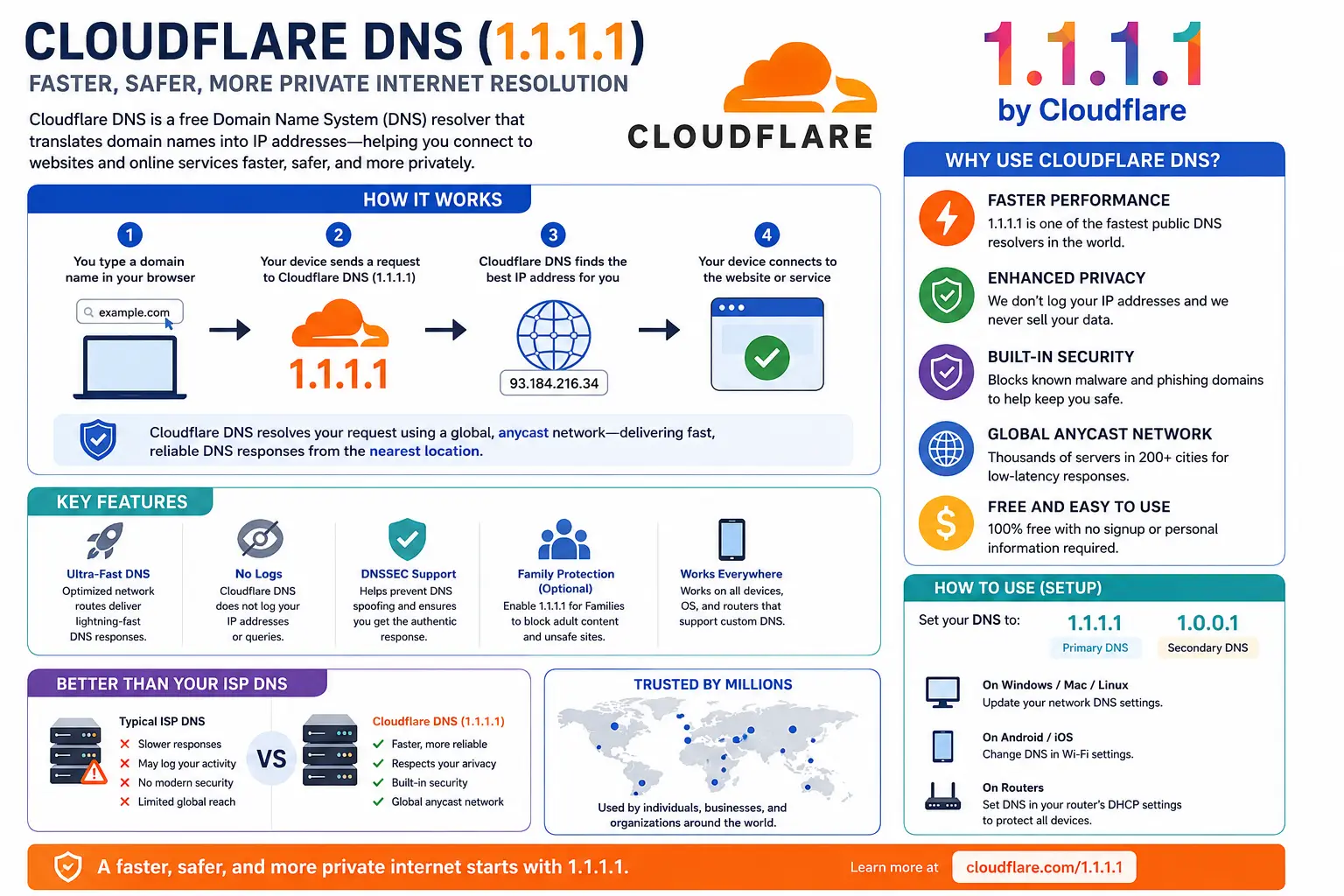
Cloudflare operates the largest anycast DNS network on the planet, with points of presence (PoPs) in 300+ cities. For most users, this translates to sub-20ms DNS resolution. In my own testing from a major US metro, Cloudflare consistently returned A-record queries in 8–12ms. From Southeast Asia, it held steady at 15–18ms.
The catch: Cloudflare’s 1.1.1.1 offers no built-in security filtering. If you want malware blocking, you need to use 1.1.1.2 (malware only) or 1.1.1.3 (malware). These filtered variants use the same infrastructure but apply blocking rules at the resolver level. I’ve seen no measurable latency difference between the filtered and unfiltered endpoints.
Another catch: Cloudflare’s privacy policy is strong on paper — no logging of IP addresses, annual audits by KPMG — but you’re still trusting a US-based corporation with your query data. For most users, this is acceptable. For journalists, activists, or those in regions with aggressive surveillance, it may not be.
Gaming note: Cloudflare’s DDoS mitigation is enterprise-grade. If you’re a streamer or competitive player worried about targeted attacks, Cloudflare’s infrastructure absorbs attacks that would swamp smaller resolvers.
Google Public DNS (8.8.8.8): The Boring, Reliable Choice
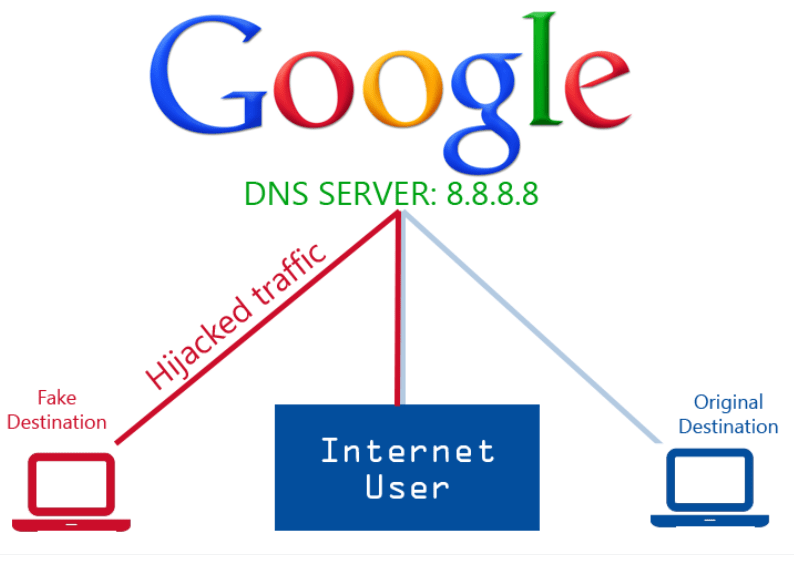
Google’s resolver is the most widely used public DNS on Earth. It handles trillions of queries daily and has been operational since 2009 with virtually no major outages. If you want to set DNS once and never think about it again, this is your pick.
The tradeoff: Google logs queries. They anonymize IP addresses after 24–48 hours and don’t use DNS data for ad targeting, but the logging exists. For privacy purists, this is disqualifying. For everyone else, it’s a reasonable compromise for infrastructure you can trust to be online.
Gaming note: Google’s global routing intelligence is unmatched. If you play games with servers in obscure regions, Google’s resolver often returns better-optimized CDN endpoints than smaller providers. This matters more for download speeds (game updates) than in-game ping.
Quad9 (9.9.9.9): The Security-First Sweet Spot
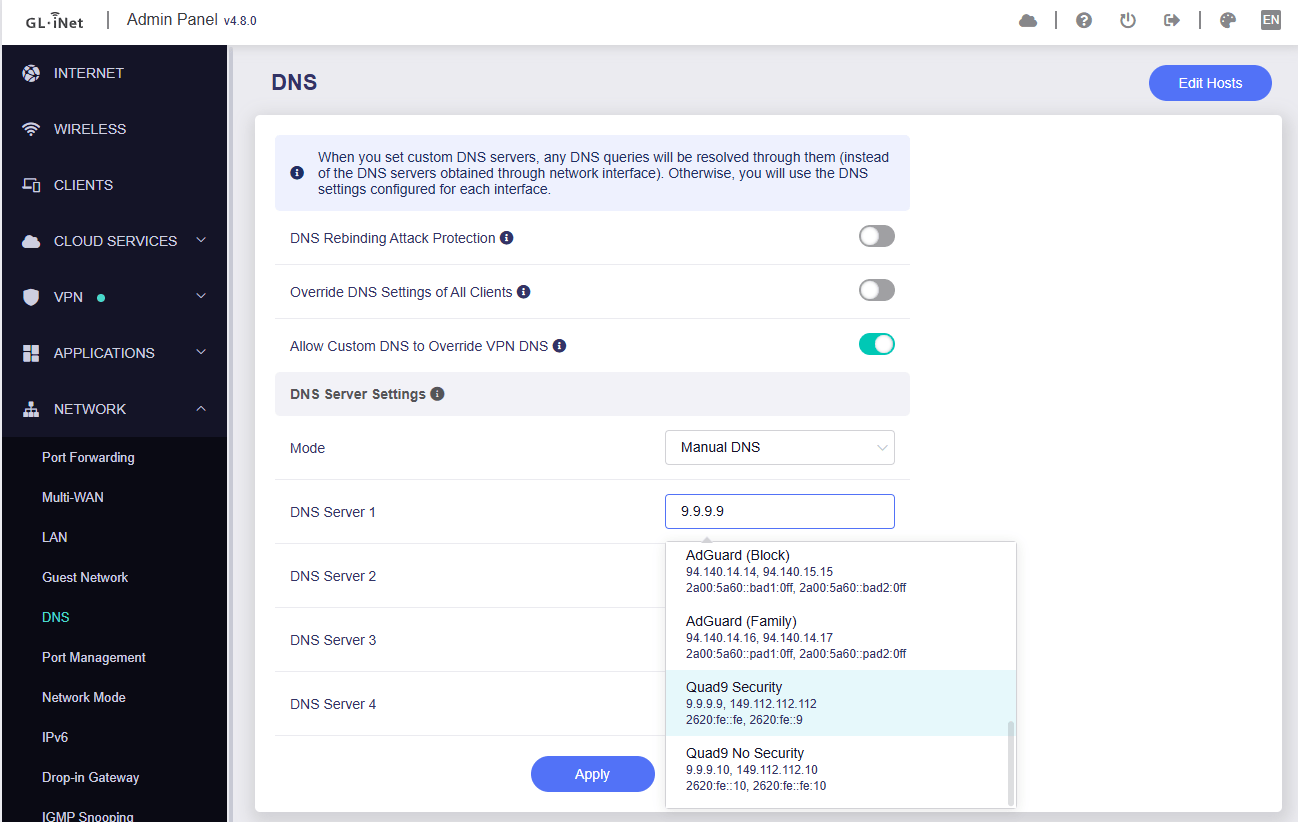
Quad9 is a Swiss non-profit foundation blocking malware and phishing domains via real-time threat intelligence feeds from 20+ partners. Unlike Cloudflare’s filtered variants, Quad9’s blocking is its core mission, not an afterthought.
The performance reality: Quad9 is slightly slower than Cloudflare in most regions — typically 5–15ms behind. But for users who would otherwise run antivirus software or browser extensions for malware protection, Quad9 removes that layer of overhead entirely. The net system performance gain often outweighs the DNS latency cost.
Privacy posture: Quad9 is the gold standard. No query logging. No data monetization. GDPR-compliant. Swiss jurisdiction. If privacy is your top priority and you still want decent speed, Quad9 is the answer.
Gaming note: Quad9’s malware blocking can occasionally flag legitimate gaming sites, particularly those using aggressive ad networks or unofficial mod repositories. I’ve seen false positives on smaller indie game distribution platforms. If you encounter connection issues, temporarily switch to an unfiltered resolver to diagnose.
NextDNS: The Power User’s Dream (With a Billing Trigger)
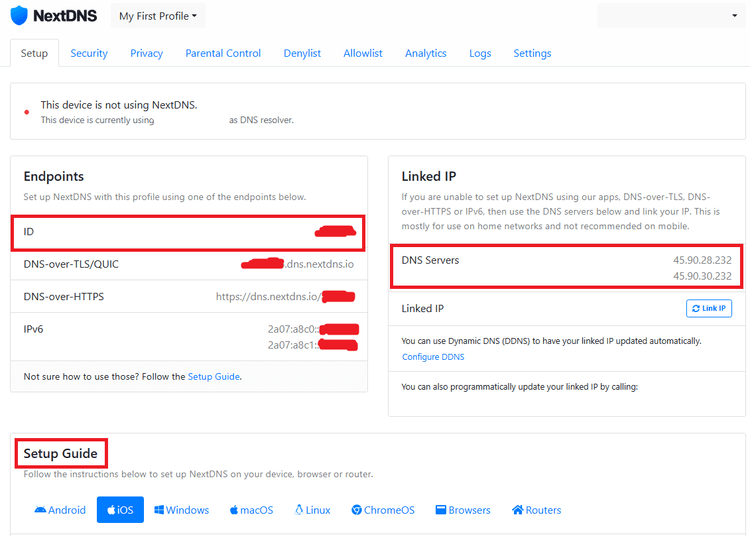
NextDNS offers something no other provider matches: per-device, per-app, per-time-of-day DNS policies. Want to block TikTok on your teenager’s phone but not yours? Route Netflix through a specific country? Log queries for 24 hours to debug a network issue? NextDNS does it all.
The free tier trap: NextDNS allows 300,000 queries per month on the free plan. This sounds generous until you do the math. A single smartphone with background apps, push notifications, and ad-laden websites can generate 10,000+ queries daily. A household with 5 devices will blow past the cap in a week. Once exceeded, NextDNS reverts to a basic, unfiltered resolver — meaning your malware blocking, ad blocking, and logging all vanish without warning.
The paid reality: At $19.90/year, NextDNS Pro is reasonably priced for unlimited queries and full features. But this is no longer a “free DNS switch” — it’s a subscription service. Factor that into your decision.
Gaming note: NextDNS’s analytics are genuinely useful for diagnosing network issues. If you’re experiencing intermittent lag and suspect DNS is involved, NextDNS can show you exactly which domains are being queried, how long resolutions take, and whether any are being blocked. No other consumer DNS offers this visibility.
DNS4EU: The New European Contender
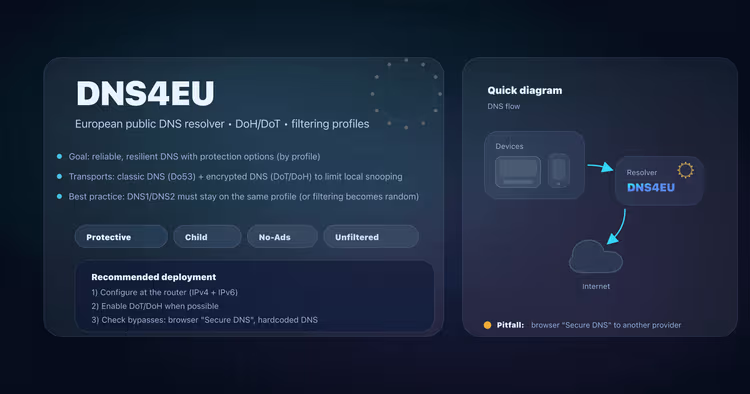
Launched in June 2025, DNS4EU is the European Union’s answer to US-dominated DNS infrastructure. Co-funded by the EU and operated by a consortium led by Czech cybersecurity firm Whalebone, it offers five filtering profiles and processes all data within EU borders.
The performance picture: From Europe, DNS4EU is competitive — averaging 15–25ms in my tests from Western Europe, comparable to Cloudflare. From outside the EU, latency jumps significantly. The infrastructure is still expanding; as of early 2026, coverage in Asia-Pacific and Latin America is thin.
The privacy nuance: DNS4EU’s privacy policy is GDPR-aligned and EU-law compliant, but it’s not as minimalist as Quad9’s. Query logs are anonymized using HMAC-SHA256 and retained for up to 6 months for threat research. The anonymization is technically sound, but privacy maximalists may prefer Quad9’s no-log approach.
The sovereignty angle: For EU residents concerned about data transfers to the US under the CLOUD Act or Schrems II rulings, DNS4EU offers genuine jurisdictional separation. Your DNS queries never leave EU data centers. This matters for compliance in regulated industries and for personal peace of mind.
Regional Performance: Where You Live Changes Everything
DNS latency is fundamentally geographic. A resolver that’s fastest in New York may be mediocre in Mumbai. Here are the regional winners based on 2026 benchmark data:
| Region | Fastest DNS | Typical Latency | Notes |
|---|---|---|---|
| US & Canada | Cloudflare | 8–15ms | ISP DNS often 30–80ms; switching almost always helps |
| Western Europe | Cloudflare / DNS4EU | 10–20ms | Quad9 excellent for privacy; DNS4EU best for EU data residency |
| UK & Ireland | Cloudflare | 10–18ms | Post-Brexit, DNS4EU still performs well but not officially “EU” |
| Nordics | Cloudflare / Quad9 | 10–18ms | Mullvad viable for privacy, slightly slower |
| Middle East | Cloudflare | 15–25ms | DoH recommended to bypass ISP filtering/hijacking |
| India | Cloudflare / Google | 12–25ms | BSNL users see massive gains switching from ISP DNS (60–120ms) |
| Southeast Asia | Cloudflare | 10–18ms | Singapore PoP serves region well; Indonesian users may need DoH |
| East Asia (Japan/Korea) | Cloudflare / Google | 8–15ms | Excellent local infrastructure |
| China | 114.114.114.114 / 223.5.5.5 | Varies | Cloudflare/Google blocked or filtered; use local resolvers |
| Latin America | Cloudflare | 15–25ms | Major improvement over ISP DNS (40–80ms) |
| Africa | Cloudflare | 20–35ms | Often the biggest quick win vs ISP DNS (50–100ms+) |
Source: Aggregated from DNSPerf, regional testing, and user reports.
Encrypted DNS: DoH, DoT, and the Latency Tax
DNS over HTTPS (DoH) and DNS over TLS (DoT) encrypt your DNS queries, preventing ISPs, Wi-Fi operators, and middleboxes from seeing which domains you visit. This is valuable for privacy. But it comes with a cost.
The overhead: Every new encrypted DNS connection requires a TCP handshake plus TLS negotiation. Academic testing shows this adds at least 30ms of latency compared to unencrypted UDP DNS for the first query of a session. Subsequent queries on the same connection reuse the TLS tunnel, so the penalty drops to near-zero.
The gaming impact: For gaming, this means your first matchmaking lookup might take 30ms longer with DoH/DoT than with plain DNS. If you play one long MMO session, this is irrelevant. If you play 20 rounds of Apex Legends with server rotation between each, the cumulative delay adds up.
My recommendation: Use encrypted DNS on mobile devices and laptops (where you connect to untrusted networks). On your dedicated gaming PC or console connected to home Ethernet, plain DNS to a trusted provider like Cloudflare or Quad9 is fine. The privacy gain of encrypting DNS on a home network is minimal compared to the latency cost for frequent lookups.
DNS over QUIC (DoQ): The newest protocol, supported by Control D, NextDNS, and Mullvad, runs DNS over QUIC instead of TCP+TLS. Early testing suggests it reduces the handshake overhead to roughly 10–15ms. If your devices and resolver support it, DoQ is the best compromise between speed and encryption.
Expert Insights: What the Benchmarks Don’t Tell You
The ISP DNS Paradox
Here’s something almost no “best DNS” article mentions: your ISP’s DNS might already be the fastest option for you.
ISPs run local DNS caches inside their network, often physically located at the edge of their infrastructure — sometimes in the same building as your local exchange. A query to your ISP’s resolver never leaves their network. A query to Cloudflare leaves your ISP, traverses peering points, and reaches the nearest Cloudflare PoP.
In practice, I’ve seen ISP DNS outperform Cloudflare by 5–10ms for users in well-connected metro areas with major ISPs (Comcast, AT&T, Deutsche Telekom). The catch? Most ISP DNS servers are slow (30–80ms), unreliable, log your queries for advertising purposes, and are vulnerable to DNS hijacking. But the performance gap isn’t universal.
How to test: Run dig @your.isp.dns google.com and dig @1.1.1.1 google.com from your connection. If your ISP wins by >5ms consistently, consider keeping it — but only if you trust their privacy practices.
The CDN Routing Problem
DNS resolvers don’t just return IP addresses; they return the best IP address based on the resolver’s location, not yours. This is called CDN optimization.
When you query steampowered.com, the DNS resolver tells Akamai or Cloudflare’s CDN which PoP is closest to the resolver, not to you. If you’re in Denver but your DNS resolver routes through Los Angeles, you might get a California CDN node instead of a Denver one. This increases download latency for game updates.
Google and Cloudflare have invested heavily in “edns-client-subnet” (ECS), a protocol extension that passes part of your IP prefix to authoritative DNS servers, allowing better geo-routing. Most major CDNs support ECS. Smaller resolvers (Mullvad, some DNS4EU nodes) may not, leading to suboptimal CDN routing.
Practical impact: If you frequently download large game updates, Google or Cloudflare will likely give you better CDN routing than privacy-focused resolvers that strip ECS data.
The Console Gaming Blind Spot
PlayStation, Xbox, and Nintendo Switch all support custom DNS, but the implementation varies:
- PlayStation 5: Supports manual IPv4 DNS. No IPv6 DNS configuration. No DoH/DoT.
- Xbox Series X|S: Supports manual IPv4 and IPv6 DNS. No encrypted DNS.
- Nintendo Switch: Supports manual IPv4 DNS only. IPv6 DNS is auto-assigned from router.
This means console gamers are limited to plain UDP/TCP DNS on port 53. The good news: this is the fastest transport anyway. The bad news: no encryption, and no protection against DNS-based attacks on public Wi-Fi.
The Anti-Cheat DNS Dependency
Modern anti-cheat systems (Vanguard, EAC, BattlEye) perform periodic DNS lookups to verify certificate revocation lists (CRLs) and check for updates. If your DNS resolver blocks or fails to resolve these domains, you may experience:
- Game launch failures
- Mid-match disconnections
- False positive ban triggers (rare but documented)
Filtered DNS services (AdGuard, NextDNS with aggressive blocklists, Pi-hole) are the most common culprits. If you use a filtering resolver and experience anti-cheat issues, whitelist the anti-cheat vendor’s domains or switch to an unfiltered resolver for gaming.
Common Mistakes Gamers Make with DNS
Mistake 1: Expecting DNS to Fix High Ping
I’ve lost count of how many Reddit threads I’ve seen where someone switched to 1.1.1.1 and declared their ping “dropped from 80ms to 40ms.” This is almost certainly placebo or coincidental network improvement. DNS affects initial connection setup, not ongoing packet round-trip time. If your ping is high, check your physical distance to the game server, your ISP’s routing, and your local network quality — not your DNS.
Mistake 2: Using Aggressive Ad-Blocking DNS for Gaming
AdGuard DNS and NextDNS with full blocklists are fantastic for browsing. They’re terrible for gaming. Game launchers, update systems, and even some in-game telemetry systems use domains that appear on ad/tracker blocklists. Blocking them causes update failures, slow downloads, and authentication errors.
Rule of thumb: If a game breaks after switching DNS, try an unfiltered resolver first. 90% of “DNS broke my game” issues are caused by overzealous filtering, not the resolver itself.
Mistake 3: Ignoring IPv6 DNS
Most guides tell you to set IPv4 DNS and forget about IPv6. This is a mistake. If your network has IPv6 connectivity (and most do in 2026), your device will use IPv6 DNS auto-configuration from your router unless you explicitly override it. If you set Cloudflare’s IPv4 DNS but leave IPv6 on auto, your device may still query your ISP’s IPv6 DNS — leaking your browsing data and potentially causing inconsistent resolution.
Always set both IPv4 and IPv6 DNS. For Cloudflare: 2606:4700:4700::1111 and 2606:4700:4700::1001. For Google: 2001:4860:4860::8888 and 2001:4860:4860::8844.
Mistake 4: Not Testing Before Committing
DNS performance varies by ISP, city, time of day, and even the specific domains you query. A resolver that’s fastest for your friend in Chicago may be slower for you in Dallas. Use dig, nslookup, or a tool like DNS Benchmark to test from your actual connection before changing your router settings.
Mistake 5: Forgetting the Fallback
If you set a single custom DNS and that resolver goes down or starts blocking a domain you need, you’re offline. Always configure a primary and secondary DNS from different providers. My recommended pairing: Cloudflare primary (1.1.1.1) + Google secondary (8.8.8.8). Both are fast, both are reliable, and they use different infrastructure. If Cloudflare has a regional issue, Google picks up the slack.
Decision Framework: Which DNS Should You Actually Use?
Use this flowchart to cut through the noise:
Step 1: What’s your primary concern?
- Speed above all else → Cloudflare 1.1.1.1
- Reliability and compatibility → Google 8.8.8.8
- Security + privacy balance → Quad9 9.9.9.9
- Maximum control and visibility → NextDNS Pro ($19.90/year)
- EU data residency → DNS4EU 86.54.11.100
- Ad blocking at the network level → AdGuard DNS 94.140.14.14
Step 2: Do you need filtering?
- No filtering → Use the base IP of your chosen provider
- Malware blocking only → Cloudflare 1.1.1.2 or Quad9 9.9.9.9
- Malware + blocked news sites → Cloudflare 1.1.1.3 or CleanBrowsing Family
- Ads + trackers + malware → AdGuard DNS or NextDNS with blocklists
- Custom per-device rules → NextDNS Pro only
Step 3: What’s your network setup?
- Single gaming PC → Set DNS in OS network settings
- Whole home network → Set DNS on router; covers all devices
- Mixed devices (PC + console + phones) → Router-level DNS + per-device overrides for phones (DoT)
- Public Wi-Fi gaming → Use a VPN; DNS alone won’t protect you
Step 4: Test and verify
- Run
nslookup google.comto confirm your custom DNS is active - Use a DNS leak test to verify no ISP DNS fallback
- Monitor for 48 hours: any broken sites, slower downloads, or game issues?
Setup Guides by Platform
Windows 11
- Settings → Network & Internet → Advanced network settings → More network adapter options
- Right-click your adapter → Properties → Internet Protocol Version 4 (TCP/IPv4) → Properties
- Select “Use the following DNS server addresses”
- Enter Primary: 1.1.1.1, Secondary: 1.0.0.1
- Repeat for IPv6: 2606:4700:4700::1111 and 2606:4700:4700::1001
- Run
ipconfig /flushdnsin Command Prompt (Admin)
macOS
- System Settings → Network → Details (on your active connection) → DNS
- Click + and add 1.1.1.1 and 1.0.0.1
- For IPv6, add 2606:4700:4700::1111 and 2606:4700:4700::1001
- Click OK
PlayStation 5
- Settings → Network → Settings → Set Up Internet Connection
- Select your network → Advanced Settings → DNS Settings → Manual
- Primary: 1.1.1.1, Secondary: 1.0.0.1
- Note: PS5 does not support IPv6 manual DNS or encrypted DNS
Xbox Series X|S
- Settings → General → Network Settings → Advanced Settings → DNS Settings → Manual
- Primary: 1.1.1.1, Secondary: 1.0.0.1
- For IPv6: Settings → Network → Advanced Settings → IPv6 DNS → Manual → 2606:4700:4700::1111 and 2606:4700:4700::1001
Router-Level (Recommended for Households)
- Log into router admin panel (usually 192.168.1.1 or 192.168.0.1)
- Find WAN or Internet settings → DNS Server
- Set Primary and Secondary DNS
- This covers all devices on your network automatically
FAQ About Public DNS Servers
Will changing my DNS lower my ping in Call of Duty / Valorant / Fortnite?
No. DNS affects how quickly you find the game server, not the latency of communicating with it once connected. Your in-game ping is determined by physical distance, ISP routing, and network congestion.
Is Cloudflare DNS really the fastest?
For most users in most regions, yes. But “fastest” depends on your location and ISP. Test it yourself with dig or DNS Benchmark before committing.
Can DNS cause lag spikes or rubber-banding?
Not directly. However, if your DNS resolver is unreliable and drops queries, your game client may stall while waiting for resolution. This manifests as a brief freeze at matchmaking or during anti-cheat checks, not as ongoing lag.
Should I use encrypted DNS (DoH/DoT) for gaming?
On a trusted home network, the privacy benefit is minimal and the latency cost is real. Use plain DNS for gaming rigs. Use encrypted DNS on mobile devices and laptops that connect to public Wi-Fi.
Why does my game break after switching DNS?
Most likely, you’re using a filtered DNS (AdGuard, NextDNS with blocklists, Pi-hole) that’s blocking a domain the game needs. Switch to an unfiltered resolver like 1.1.1.1 or 8.8.8.8.
Is Google DNS safe to use?
From a security perspective, yes — it’s extremely reliable and well-maintained. From a privacy perspective, Google logs queries (anonymized after 24–48 hours). If this concerns you, use Quad9 or Mullvad instead.
What’s the best DNS for console gaming?
Cloudflare (1.1.1.1) or Google (8.8.8.8) are safe defaults. Consoles don’t support encrypted DNS anyway, so speed is the only variable that matters.
I hit the NextDNS free tier limit. What happens?
NextDNS stops filtering and logging but continues resolving queries. You’re essentially using a basic, unfiltered resolver until the next billing month. For a busy household, the Pro plan ($19.90/year) is necessary.
Is DNS4EU better than Cloudflare for EU users?
A: For data sovereignty and GDPR compliance, yes. For raw speed, Cloudflare is still faster in most EU regions. DNS4EU is improving rapidly but is a newer service with less global coverage.
Conclusion
The best public DNS server for you depends on what you’re actually optimizing for. If you want the lowest possible latency for initial connections, Cloudflare 1.1.1.1 is the global benchmark. If you want reliability without thought, Google 8.8.8.8 is the safe default. If you want security baked in, Quad9 9.9.9.9 strikes the best balance. If you want granular control, NextDNS Pro is worth the annual fee.
But the most important takeaway is this: DNS is a small piece of the gaming performance puzzle. It won’t lower your ping. It won’t fix packet loss. It won’t compensate for a 200ms route to a distant server. What it can do is shave seconds off your matchmaking time, speed up launcher authentication, and add a layer of security against malware and phishing.
Switch your DNS. Test it for a week. If you notice improvement, great. If you don’t, you haven’t lost anything — and you can stop wondering whether you’re leaving performance on the table. The real wins in gaming performance come from wired connections, quality routers, ISP selection, and geographic proximity to game servers. DNS is just the cherry on top.
Configure it correctly, understand its limits, and move on to the optimizations that actually matter.
You May Also Like
 Proxies
Top 10 Free Proxy Websites in 2026: My Complete Testing Guide
 VPN
VPN
Cloudflare WARP as a Free VPN Alternative: Review After Months of Daily Use
 VPN
VPN
Can You Use a VPN on a School Chromebook? (What Works + What’s Allowed)
 Proxies
What Are Residential Proxies: Use Cases and Best Providers in 2026
 Tiktok
Does TikTok Detect VPN Usage? Everything You Need to Know
 VPN
VPN
What Is an Obfuscated VPN? Your Complete Guide to Bypassing Blocks and Staying Private Online
 WordPress
10 Best Free Online Server Status Checker Websites: Complete Guide to Monitor Your Server Health
 Cyber Security
What Is the Dark Web and How Can You Access It? Beware!
 VPN
VPN